Startup MVPs
Turn one schema file into a running API in minutes, before the idea gets cold.
Schema-driven Python framework · v0.1.10
tamilPY reads one schema.tpy file and generates a fully layered FastAPI app — models, migrations, services, and routes — for SQLite, PostgreSQL, MySQL, or MongoDB. v0.1.10 adds tpy studio, starter templates, incremental make:* commands, and shared schema serialize/validate.
Where it fits
Built for developers who'd rather write a schema once than write the same CRUD boilerplate again.
Turn one schema file into a running API in minutes, before the idea gets cold.
Every project gets the same models, migrations, services, and routes — no drift between teams.
Read a clean, layered architecture: repository → service → controller → route, generated in the open.
Pick SQLite, PostgreSQL, MySQL, or MongoDB at build time. Switch later with one command.
Getting started
Install from PyPI, then scaffold your first project.
$ pip install tamilPY
$ pip install "tamilPY[redis]"    # optional
$ pip install "tamilPY[all]"      # all drivers
$ tpy new myapp
$ cd myapp
Revision 01
The exact path an application developer follows, start to serve.
tpy new myapp scaffolds folders, schema.tpy, the logger, and seed files.
Define models and fields in schema.tpy — types, primary keys, required, unique.
tpy build asks for SQLite, PostgreSQL, MySQL, or MongoDB, then host, port, user, and password — and writes .env for you.
Run tpy migrate, then tpy seed, to apply the schema and load sample data.
tpy serve starts FastAPI. Logs stream to the console and to storage/logs/app.log.
Capability map
One schema file drives generation, migrations, and a layered FastAPI app.
Edit schema.tpy, run tpy build or tpy crud, and get models, migrations, schemas, repositories, services, controllers, and routes.
SQLite, PostgreSQL, MySQL, or MongoDB via the build wizard. Reconfigure anytime with tpy db configure.
tpy migrate creates the Postgres/MySQL database when missing, then applies ordered migrations.
Each model gets list, show, create, update, and delete endpoints under a plural prefix (e.g. /users).
Repository → Service → Controller → Route — generated consistently so every project looks the same.
Read guide → Feature 06Apply schema with migrations, load sample data with seeders, run the API with tpy serve or python main.py.
Console + storage/logs/app.log via app/logger.py. Probe liveness with GET /health.
tpy admin generates a Vite + React dashboard in admin/ with list, create, edit, and delete for every schema model.
tpy auth adds login, register, refresh, and logout with AuthRole + User defaults. Dashboard access is limited to super-admin and developer.
tpy doctor checks project files. tpy db info / tpy db ping inspect and test the connection.
Fluent QueryBuilder. Schema relations { } with eager with_() loading.
Sync event bus, background jobs (tpy queue work), cron-style tpy schedule run.
Memory / file / Redis cache. ApiResponse envelopes. Pipe-rule validate().
Application providers & plugins, middleware groups, /health, lifecycle hooks.
Log channels, nested Config, file storage, tpy route cache.
tpy optimize, richer CLI (-V, about), tpy watch rebuild on schema change.
Runtime platform
Runtime platform (Query Builder through watch) plus v0.1.10 Studio, templates, and make commands.
tpy studio
# http://127.0.0.1:4200 — schema · DB · auth · build SSE
Local UI with preview/diff before writing schema.tpy. No end-user npm required.
tpy new myapp --template crm
tpy templates list
tpy admin --template crm
crm · institute-admin · inventory · helpdesk · blog-cms with admin themes.
Read guide → DX · 0.1.10tpy make:model Invoice --fields "amount:float,status:enum(draft,paid)" tpy make:service Invoice --force
Incremental generation + # tpy:generated:sha256: markers.
repo.query().where("status", "draft").order_by("created_at").get()
repo.query().with_("author").find(id)
Schema relations { belongs_to User as author via user_id }. Eager load with with_().
bus = EventDispatcher()
bus.listen(OrderPlaced, LogOrder())
bus.dispatch(OrderPlaced("ord_1"))
listen · dispatch · dispatch_until · wildcard "*" · event.stop().
Queue(SyncQueueDriver()).push(SendWelcomeEmail("u1"))
# CLI: tpy queue table | tpy queue work --driver database
Drivers: sync, database, redis (tamilPY[redis]).
# app/schedule.py
def register(schedule):
    schedule.command("cache:clear").daily()
# CLI: tpy schedule run | list
Cron helpers, overlap locks, due-task runner.
Read guide → Cachecache.put("key", value, ttl=60)
cache.get("key", default=None)
# CLI: tpy cache clear
Stores: memory, file (storage/framework/cache), Redis.
return ApiResponse.success(data)
return ApiResponse.created(row)
return ApiResponse.paginated(items, meta)
return ApiResponse.validation_error(exc)
Uniform JSON envelopes for FastAPI controllers.
Read guide → Validationdata = validate(payload, {
"email": "required|email",
"age": "required|integer|min:18",
"role": "nullable|in:admin,user",
})
Custom rules via Validator.extend(...).
Application(".").register(AppServiceProvider).create()
# or Application(".").mount(existing_fastapi)
Container make() / singleton(). Entry-point plugins supported.
MiddlewareManagerGET /health · GET /health/readyget_logger("app").info("booted")
cfg = Config.load_auto(".")
cfg.get("app.name")
# tpy config show | cache | status | clear
Prefer cache with TPY_CONFIG_CACHE=1.
Storage.disk("local").put("a.txt", b"hi")
# tpy route cache | list --cached | clear
# tpy optimize   # config + routes
Local disk + S3-ready driver surface.
Read guide → DXtpy -V tpy about tpy commands tpy watch # rebuild on schema.tpy change tpy watch --with-db
Pair with tpy serve --reload in a second terminal.
Generated UI
Run tpy admin (or tpy build --with-ui) to generate a Vite + React
dashboard in admin/ — list, create, edit, and delete for every model in
schema.tpy.
$ tpy serve
$ tpy admin
$ cd admin && npm install && npm run dev
API at http://127.0.0.1:8000 ·
Admin UI at http://127.0.0.1:5173
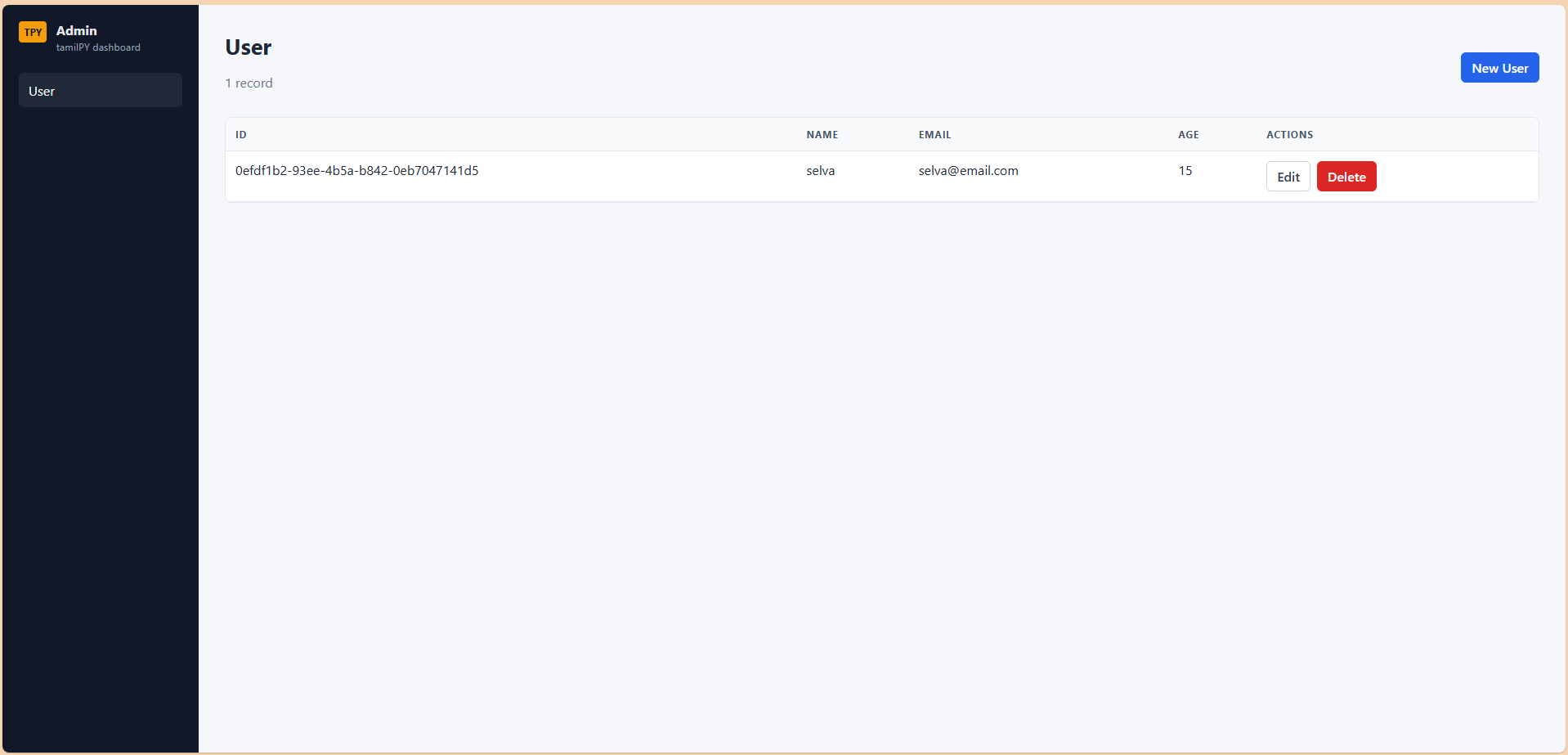
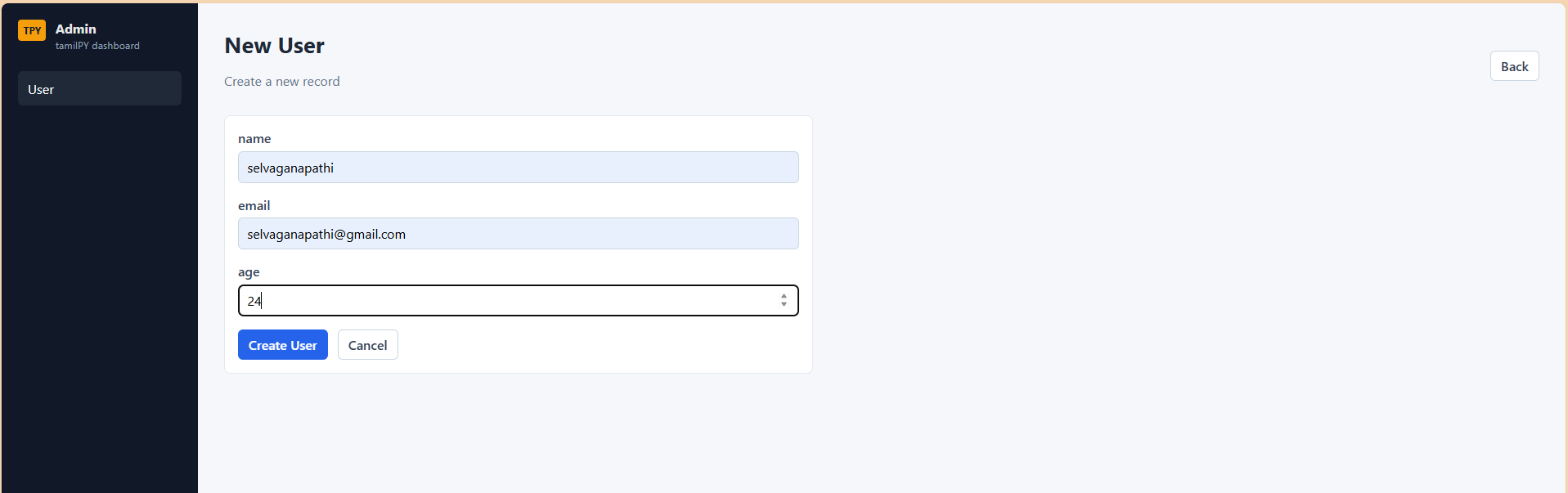
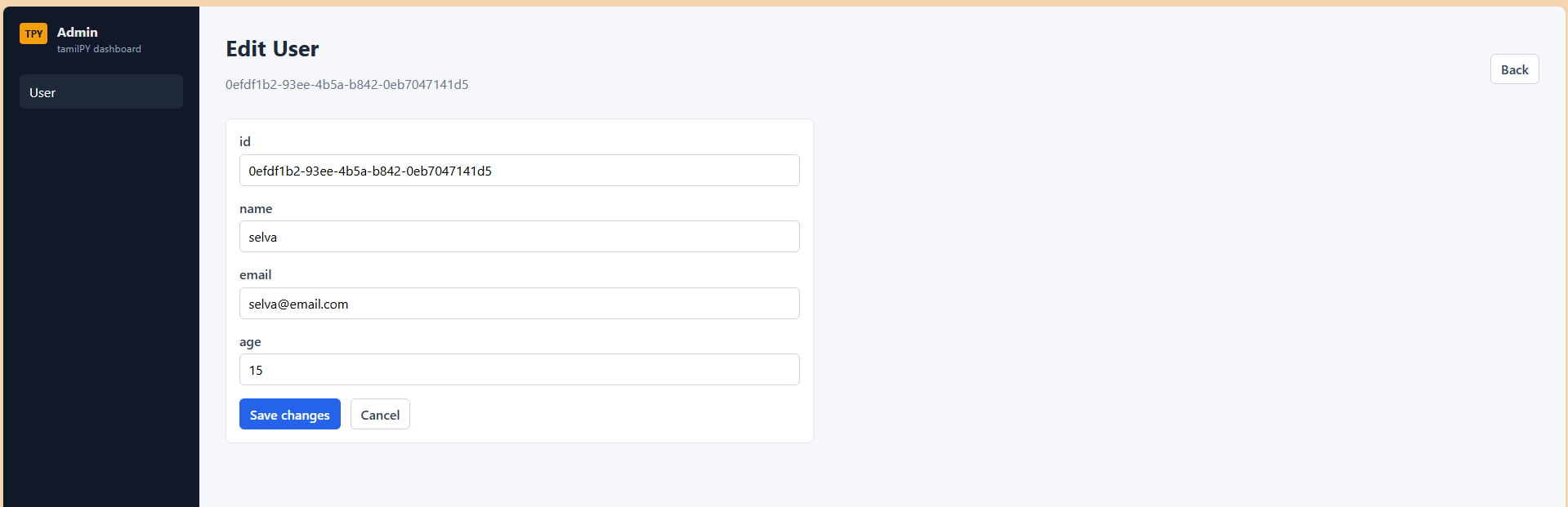
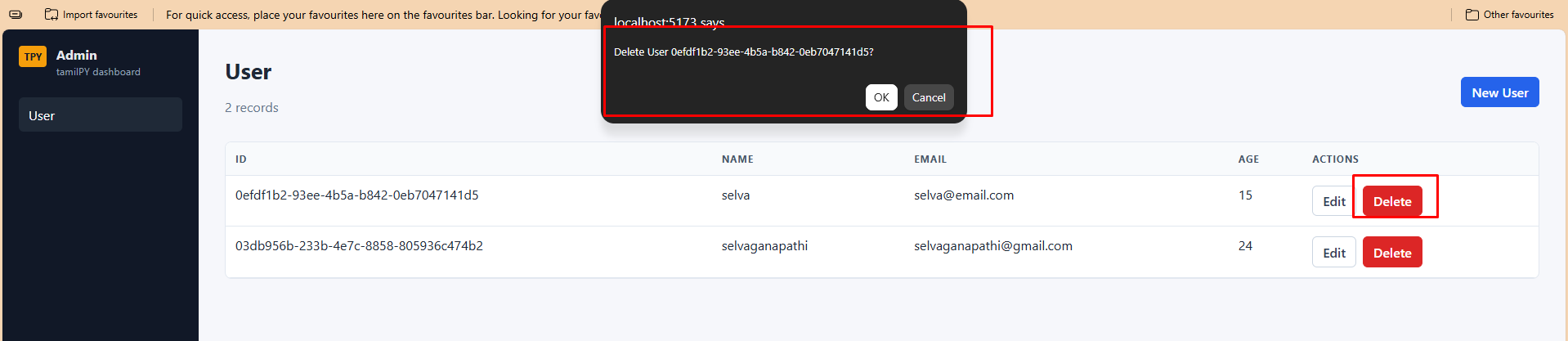
src/data/models.js is built from schema.tpy. Shared list and form pages cover every model — no hand-written page per entity.
Modern SPA under admin/ with Layout, DataTable, and RecordForm components wired to your FastAPI CRUD routes.
After schema changes, run tpy admin again to regenerate the dashboard so the UI stays in sync with your models. With tpy auth enabled, the UI includes login and role checks.
Security
Run tpy auth for Django-style auth: default AuthRole + User,
JWT access + refresh tokens, and an admin login gate.
$ tpy auth
$ pip install -r requirements.txt
$ tpy migrate && tpy seed
$ tpy serve
$ tpy admin
Default login:
admin@example.com /
admin123
(super-admin)
AuthRole — super-admin, admin, developerUser — name, email, password (hashed), role_idPOST /auth/registerPOST /auth/login — access + refreshPOST /auth/refreshPOST /auth/logoutGET /auth/mesuper-admin and developer can open the React admin UI. The admin role is API-only.
Short-lived access JWT (default 15m) plus long-lived refresh JWT (default 7d). Logout revokes the refresh token server-side.
Language reference
Types, constraints, defaults, indexes, foreign keys, and multi-model examples.
# optional provider line
database postgres

model ModelName {
  field: type constraint...
}
Use # for comments. Keywords are case-insensitive.
int — integerstring — text / VARCHARfloat — floating pointbool — booleanuuid — UUID primary keysdatetime — timestampprimary — primary keyrequired — required in create APIunique — UNIQUE columnnullable — allow NULL / optionalindex — create an indexdefault <value> — column defaultreferences <Model> — foreign keyNon-primary fields without nullable become NOT NULL in SQL.
database sqlitedatabase postgresdatabase mysqldatabase mongodbUsually written for you by tpy build / tpy db configure.
Examples
Start from these patterns, then run tpy crud.
# 01 — starter User
database sqlite

model User {
  id: uuid primary
  name: string required
  email: string unique required
  age: int
}
# 02 — defaults + index
database postgres

model Product {
  id: uuid primary
  title: string required index
  price: float required
  active: bool default true
  stock: int default 0
  status: string default "draft"
  notes: string nullable
  created_at: datetime nullable
}
# 03 — foreign keys (references)
database postgres

model User {
  id: uuid primary
  email: string unique required
}

model Post {
  id: uuid primary
  title: string required index
  body: string nullable
  user_id: uuid references User
  published: bool default false
}
Use references <Model> on a field. Optional relations { } for eager loading:
user_id: uuid references User
relations {
  belongs_to User as author via user_id
  has_many Comment as comments
}
Define referenced models earlier so migrations run in order.
Add default <value> — a number, quoted string, or true / false.
stock: int default 0
active: bool default true
status: string default "draft"
Fields with a default become optional in the create API.
Add the index keyword to generate an index:
title: string required index
Emits CREATE INDEX idx_<table>_<column>. Primary keys are already indexed.
Generated as ordered files from model order in the schema:
001_user_migration.py002_post_migration.pyModel User → prefix /users:
GET /users/GET /users/{id}POST /users/PUT /users/{id}DELETE /users/{id}CLI reference
Full client command surface — including helpers that are easy to miss.
tpy new <name> — create projecttpy new <name> --template <t> — starter schematpy templates list | showtpy studio — visual builder (:4200)tpy build — DB wizard + generate CRUDtpy build --skip-db — generate using existing .envtpy build --with-ui — generate CRUD and admin/tpy make:model | make:controller | make:servicetpy crud — regenerate layers from schema onlytpy admin [--template] — React admin dashboardtpy auth — JWT auth, AuthRole + User, role seedstpy doctor — validate project filestpy version — show framework versiontpy db configure — interactive DB wizardtpy db info — show provider + URLtpy db ping — test connectiontpy migrate — create DB if needed + apply pendingtpy migrate up — same as migratetpy migrate rollback — undo latesttpy migrate status — list applied migrationstpy seed — run database/seedstpy serve — uvicorn on app.main:apptpy serve --host 0.0.0.0tpy serve --port 8080tpy serve --reload / --no-reloadpython main.py — root launcherGET /health — health checktpy queue table — create job tablestpy queue work — run workertpy schedule run — run due taskstpy schedule list — list scheduletpy cache clear — flush cachetpy config show | cache | status | cleartpy route cache | list | cleartpy optimize — config + route cachetpy watch — rebuild on schema changetpy about · tpy commands · tpy -VOutput map
After tpy build / tpy crud, each model produces this backend stack. Add tpy admin for the generated React dashboard.
app/models/<name>.pyPydantic model of your fields.
database/migrations/NNN_<name>_migration.pyOrdered up / down table migration.
app/schemas/<name>.pyCreate, Update, and Response request/response models.
app/repositories/<name>.pySQL data access: all, find, create, update, delete.
app/services/<name>.pyThin business layer over the repository.
app/controllers + app/routesFastAPI handlers and routers wired into app/main.py.
Scaffold
Created by tpy new myapp.
myapp/
  main.py                 # uvicorn launcher → app.main:app
  schema.tpy
  tpy.toml
  .env
  app/
    main.py               # FastAPI app + /health
    logger.py
    models/  schemas/  repositories/
    services/  controllers/  routes/
    providers/database.py
  database/
    migrations/           # 001_user_migration.py …
    seeds/
  storage/logs/
  admin/                  # Vite + React dashboard from tpy admin
  tests/
Reference sheet
The commands you'll reach for every day.
tpy new <name> — create projecttpy build — DB wizard + generate CRUDtpy build --skip-db — use existing .envtpy crud — regenerate CRUD from schematpy admin — generate React admin UItpy auth — enable JWT authtpy doctor — validate project healthtpy db configure — change DB anytimetpy db info — show provider + URLtpy db ping — test connectiontpy migrate — create DB if needed + migratetpy migrate rollback — undo latesttpy migrate status — list appliedtpy seed — run database/seedstpy serve — start API servertpy watch — rebuild on schema changetpy optimize — production cachesstorage/logs/app.log — log file/health · /health/ready/docs — Swagger UImodel User {
id: uuid primary
name: string required
email: string unique
age: int
}
More patterns → Schema section
Spec plate
The person behind tamilPY.

Selvaganapathi Arumugam
SOFTWARE DEVELOPER — CREATOR, TAMILPY
Builds tamilPY (TPY Framework), focused on practical developer experience, clean layered architecture, and schema-first application generation.
→ View portfolio